
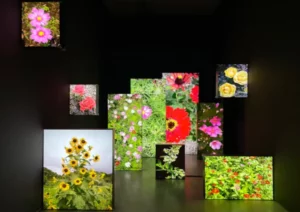
When turning a control room, conference room or public space into one single display, an indoor LED wall is the perfect solution. When specifying an indoor LED panel screen, it is less important to search for the smallest pixel pitch and more important to carefully measure and specify the correct display for the corresponding room. This includes the distance from which people view the images, what content needs to be read, the ambient room lighting and who will service the screen. All these real world conditions need to be translated into a suitable screen size, pixel pitch, screen finish and a control system to operate the screen. For large continuous images that cannot be easily created with individual LCD displays, an indoor LED panel screen installation is definitely worth considering.
An LED panel screen’s surface is modular and can be configured to fit around any given wall, stage, control room or meeting space. While this flexible format means that the usable screen size does not have to conform to a conventional screen format, every configuration still has its limitations based on the room’s structure, how one plans to service the screens, where one runs cables and where viewers will be positioned in relation to the screen.
Start by marking where people will sit, stand or move. A screen behind a conference table may be viewed from a fairly consistent distance. A lobby display may need to work for people passing close by as well as those across the room. The closest regular viewing position matters because it shows visible pixel structure first. Screen width and height, image ratio and the resolution of the content should be considered together rather than treating “bigger” as the only design goal.
Different indoor spaces create different visual priorities. Before selecting equipment, buyers can use the following comparison to identify where a project requires closer attention.
Table 1. Indoor LED Panel Screen Requirements by Application
| Aplicativo | Main Display Priority | What Buyers Should Check |
| Salas de conferência | Fine text, presentations, comfortable viewing | Nearest seat, content resolution, low-brightness performance |
| Control rooms | Readable data, continuous operation, multiple sources | Pixel density, signal management, service access |
| Retail and corporate lobbies | Visual impact and consistent colors | Ambient light, reflections, viewing angles |
| Museums and exhibitions | Image detail and tonal reproduction | Grayscale performance, surface finish, lighting conditions |
| Public information displays | Clear schedules and announcements | Text legibility, content updates, operating hours |
These details provide a clearer basis for quotations than an initial request for a particular pixel pitch.
The cost of a system, however, also increases with lower pixel pitch. As a rough guide for an indoor LED panel display, the right pixel pitch depends on the distance from the display that people will actually sit, the size of the display, the content to be displayed and the required resolution. The lowest available pixel pitch is of no use if it adds no value to the viewer from their seat.
Ask for proposed display dimensions and a pixel map and compare these to the native resolution of the content and the seat with the nearest viewing position. In a multi zone room, also check the front row seats as well as the farthest regular viewing position. The result will be far more meaningful than relying on some generic rule of thumb. Review the indoor LED display range to compare alternative indoor configurations, but select a particular model on a confirmed model by model basis.
A practical comparison follows three checks:
(1) Dark gradients: Look for visible banding or missing shadow details when brightness is reduced.
(2) Fine text: Check small labels and numbers from the closest regular viewing position.
(3) Neutral grays and skin tones: Inspect color reproduction and white-balance consistency.
(4) Module boundaries: Check for brightness differences, visible seams, and uneven cabinet alignment.
(5) Off-axis viewing: Move toward the edges of the intended viewing area and observe shifts in color or brightness.
Tests should be performed at the brightness level expected during normal operation, not only at the manufacturer’s maximum demonstration setting.

The SMD construction is the most common way to build up LED displays. The COB and GOB versions have encapsulation to protect against dust, moisture, and accidental damage to the LEDs. Encapsulation also changes the surface finish of the LEDs, making it a lot smoother. Sites with high humidity, cleaning problems, nearby pools, poor ventilation, and risk of physical damage require different construction methods than sites with clean, dry air. The training guidance flags ordinary exposed LED surfaces as a poor fit for damp environments such as pool areas. Encapsulated options may be evaluated there, with reflection and product-level protection confirmed before selection. Do not infer a specific protection rating from the construction name alone.
Table 2. SMD vs. COB vs. GOB for Indoor LED Displays
| Technology | Construction | Main Consideration | What to Verify |
| SMD | Individual packaged LEDs mounted on a PCB | Common indoor option, but exposed LEDs can be vulnerable to contact and moisture | Surface protection and maintenance requirements |
| COB | LED chips integrated on the PCB with encapsulation | Protected surface suitable for fine-pitch applications | Reflections, image quality, model-level protection |
| GOB | Protective encapsulation over mounted LEDs | Additional resistance to dust and accidental contact | Surface finish, cost, optical performance |
There are LED displays that connect to live signals from computers or media players. Other models use players or controllers to store and play out content. If you want to present, monitor, announce, or even have content playing back unattended, then these types of displays will be of interest. Centralized control of a network of displays is possible when the controller, software, network connection, and user permissions are all set up at the same time. Centralized control is not a function of the individual LED display cabinets.
For single-room displays, verify the connection to source devices for the required resolution and refresh rate. Verify the location for the control of the display and the route of the cables. If the control point is distant from the display, then verify the method of connection and the distance limits for the selected equipment. Also verify the conditions for the cameras and the shutters when shooting video for playback on the displays. The indoor HD LED display e fine-pitch LED display pages allow comparison of relevant product categories. However, verify the specific pitch, brightness, refresh rate, and control options for the quoted model.
Table 3. Indoor LED Display Control Methods
| Control Method | How It Works | Suitable Applications |
| Synchronous control | Displays a live signal received from an external source | Presentations, control rooms, live video |
| Asynchronous control | Stores content through a compatible player and supports scheduled playback | Retail advertising, welcome messages, information screens |
| Centralized management | Uses compatible controllers, software, and networking to manage multiple displays | Multi-location commercial and public information networks |
When comparing suppliers, ask for the proposed screen size, pixel pitch, cabinet arrangement, brightness range, viewing angle, refresh behavior, power information and maintenance method. The lowest initial quote may leave out engineering, access hardware or service parts that the room will need. Conversely, a higher specification is not automatically better if it solves no real viewing or operating problem.
SYVISO is a Shenzhen-based LED display technology company, with a core team bringing more than 15 years of industry experience. Its project process covers application engineering, manufacturing, customization and technical support, subject to the agreed product and scope. Share the room plan, intended content and viewer distances with SYVISO‘s project team before settling the final configuration; broader product information is available from the company.
Q1: How should an indoor LED screen’s pixel pitch be selected?
A1: Compare the closest regular viewing distance with screen dimensions and content resolution. A finer pitch can support closer viewing, but the final choice should balance visible detail, room layout and project budget.
Q2: Is COB or GOB always better for an indoor display?
A2: No. Encapsulation may suit spaces with more dust, moisture or contact risk, but the surface can reflect room lighting. Confirm the environment, finish and model-level protection before choosing.
Q3: What information helps SYVISO recommend an indoor LED panel screen?
A3: Provide room dimensions, viewer distances, ambient light, content type, camera use, mounting method, maintenance access and budget. SYVISO can then evaluate suitable product categories and confirm model-specific specifications.
Entre em contato com a SXLED
Pronto para dar vida à sua visão? Como seu parceiro de confiança em displays de LED, oferecemos soluções personalizadas, compatibilidade garantida e desempenho otimizado para cada projeto. Preencha o formulário e nossos especialistas entrarão em contato com um orçamento personalizado em até 24 horas.

Mais de 13 anos de experiência

Soluções personalizadas

Garantia de Qualidade Confiável